Incorporating audio, graphics, animation, video, and interactivity into your course materials is a great way to get students involved.
The VSM (virtual simulation & multimedia) team offers various domains of services for your course curriculum from individual elements to complete course modules, games, simulations, and even emerging technologies like AR/VR applications. The final product can be delivered over the Internet via web browsers, on mobile devices, installed on desktops, or by much-advanced equipment (i.e. Oculus VR Headsets).
Below are some examples of ways to incorporate various technologies into your course.
Multimedia
| Single Page Web Applications | ||
|---|---|---|
KOMBUCHA 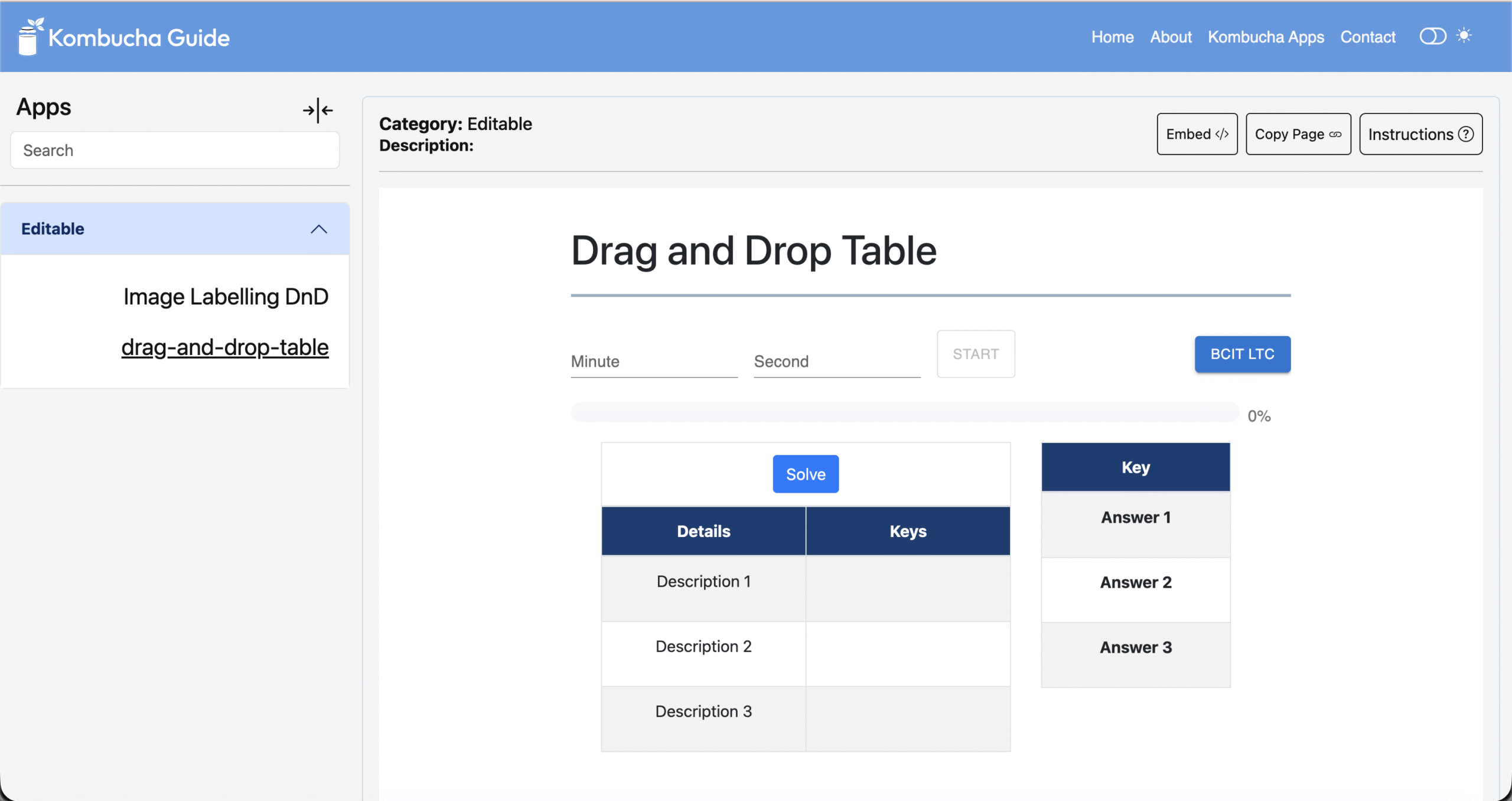 |
Distribution Game  |
|
|
Kombucha is a centralized hub for all the multimedia interaction templates developed by the VSM Team. It provides guidance for instructors on how to customize and deploy the applications on their own, which lets them incorporate tailored designs into individual courses. No coding is required: it just takes one click for deployment. Distribution Game is a two-in-one game that lets students experiment with managing product distribution for a retail business. An algorithm embedded in the game simulates the Bullwhip effect, in which a jump in demand is followed by a leveling out of the demand. Using this supply-and-demand algorithm, the game calculates key attributes such as operating profit, net profit, and order fill rate. |
||
Virtual Simulation
| Unity and VR Applications | ||
|---|---|---|
Learning & Teaching Simulation |
|
|
|
Learning and Teaching Simulation (LTS) is a centralized simulation platform that integrates custom 3D assets—such as aviation engines or human anatomy—into an immersive, seamless experience. Designed for educators, students, and professionals, LTS enhances learning, boosts productivity, and inspires creativity through rich 3D engagement. The PT6 Engine Simulation is an interactive web-based simulation tool for AME students to explore the PT6 engine’s structure and operation. It offers step-by-step assembly, disassembly, and maintenance simulations, helping learners gain hands-on experience anytime through their browser. LTS Virtual Reality is a fully standalone virtual reality training platform designed to bring hands-on learning into classrooms, labs, and remote environments—without the need for physical equipment. |
||


Multi-purpose
Using Interactive Objects throughout the Learning Process
Often one sees interactivity as a way to reinforce material that has already been taught: for example, a drag and drop activity to label the parts of the human heart. While this is an important use case for interactive objects the same object can be of greater value when used throughout the learning process.
In the spotlight
The Learning and Teaching Centre’s Virtual Simulation & Multimedia (VSM) team developed the BCIT Learning and Teaching Simulation (LTS) platform — an immersive 3D environment designed to enhance teaching and learning experiences across disciplines.
The LTS platform allows educators and students to interact with realistic 3D models in a rich, intuitive interface. Users can rotate, dissect, and assemble models, explore internal structures through transparency mode, and access detailed part lists for deeper understanding. Fully compatible across devices and adaptable to a wide range of model types, LTS enables flexible, interactive, and engaging learning—whether in the classroom or through remote delivery.
To learn more about LTS: BCIT Learning and Teaching Simulation – BCIT
Kombucha: Interactive Learning Web Application
Developed by the Virtual Simulation & Multimedia (VSM) Team, Kombucha Guide is a centralized multimedia web applications platform that hosts and manages BCIT’s interactive learning templates. It provides instructors with an intuitive platform to deploy course applications independently—no coding required.
Kombucha Guide enables seamless embedding of multimedia web applications directly into the Learning Hub with a single click. Faculty can customize embedded applications within their courses, while students retain view-only access to ensure secure, role-based permissions. Custom-designed for BCIT’s curriculum, Kombucha Guide empowers instructors to create engaging, course-specific learning experiences with ease.
To learn more about Kombucha Guide: Kombucha Guide – BCIT
Contact
Supervisor, VSM Team
Jason Chien
Team Email: vsm_team@bcit.ca