Autodesk licensing changes
As of May 26, 2026 anyone who requires access to Autodesk products on personal devices as well as BCIT issued lab and staff devices will need to create an Autodesk account and confirm their eligibility with Autodesk’s verification service before they are able to access the applications.
Licensing
Autodesk product licensing is available to students, staff, and facility for the sole purpose of educational instruction. Using this software for any commercial or for profit purposes (including corporate training) is a violation of BCIT’s license agreement.
Accessing and installing the software
To access and install Autodesk products, students and/or instructors will need to create an Autodesk account and confirm their eligibility with Autodesk’s verification service.
Once you created and verified your Autodesk account follow these steps to add products to your account:
- Navigate to https://manage.autodesk.com/products/all
You may be required to sign in with your Autodesk account. - Click on Add Products.

- Locate the product that you wish to use and click Select.

- Click Select.

- Click Submit.
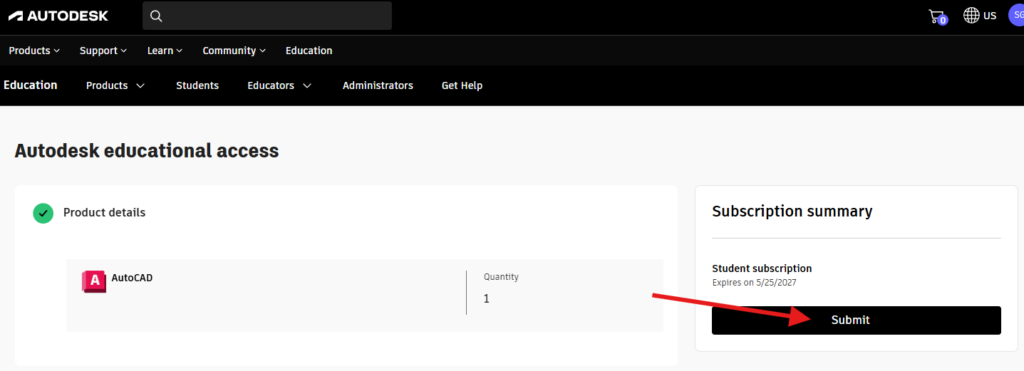
Repeat these steps if additional Autodesk products are required.
Support
Support is available on the Autodesk support site. IT Services does not support the download or installation of this software.
FAQ on documentation Autodesk may need
More information about software licensing
-
Frequently Asked Questions About BCIT-Issued Laptops for Faculty and Staff
-
Problem with Windows Security pop-up when launching Application
-
Problem with Windows Security pop-up when launching ShareLink Application
-
Software Installed on BCIT-issued Windows Devices for Employees
-
Testing AppsAnywhere Software in BCIT Computer Labs Remotely